
https://servers9.com/wp-content/cache/breeze-minification/js/breeze_how-to-install-cyberpanel-on-your-server-recommend-1-13742-inline_script_1.js?ver=1786054570
https://servers9.com/wp-content/cache/breeze-minification/js/breeze_how-to-install-cyberpanel-on-your-server-recommend-1-13742-js-timeme-timeme.min.js?ver=1786054570
https://servers9.com/wp-content/cache/breeze-minification/js/breeze_how-to-install-cyberpanel-on-your-server-recommend-1-13742-burst-js-burst.min.js?ver=1786054570
https://servers9.com/wp-content/cache/breeze-minification/js/breeze_how-to-install-cyberpanel-on-your-server-recommend-1-13742-inline_script_2.js?ver=1786054570
https://servers9.com/wp-content/cache/breeze-minification/js/breeze_how-to-install-cyberpanel-on-your-server-recommend-1-13742-js-js-front-end-breeze-prefetch-links.min.js?ver=1786054570
https://servers9.com/wp-content/cache/breeze-minification/js/breeze_how-to-install-cyberpanel-on-your-server-recommend-1-13742-js-jquery-jquery.min.js?ver=1786054570
https://servers9.com/wp-content/cache/breeze-minification/js/breeze_how-to-install-cyberpanel-on-your-server-recommend-1-13742-js-jquery-jquery-migrate.min.js?ver=1786054570
https://servers9.com/wp-content/cache/breeze-minification/js/breeze_how-to-install-cyberpanel-on-your-server-recommend-1-13742-vendor-dom-purify-purify.min.js?ver=1786054570
You are here:
Home /
News /
CyberPanel /
How to Install CyberPanel on Your Server (Recommended OS, RAM, and More) How to Install CyberPanel on Your Server (Recommended OS, RAM, and More)
Servers9
If you’re looking for a fast, secure, and modern hosting control panel, CyberPanel is one of the best free options available. Powered by OpenLiteSpeed (or LiteSpeed Enterprise), itβs designed for high performance, security, and easy management.
In this guide, weβll show you how to install CyberPanel properly on your server, including the recommended OS , RAM requirements , and important tips for a successful installation.
π Why Choose CyberPanel? Built on OpenLiteSpeed/LiteSpeed Web Server Free SSL certificate issuance Auto-install WordPress and LSCache DNS, Email, FTP, and database management included HTTP/3 and QUIC support Lightweight and super fast compared to cPanel π§© System Requirements for CyberPanel Before you install, make sure your server meets these requirements:
Requirement Minimum Recommended Operating System Ubuntu 18.04/20.04/22.04, AlmaLinux 8 or 9, CloudLinux 8 AlmaLinux 8 or Ubuntu 22.04 CPU 1 Core 2+ Cores RAM 1 GB 2+ GB (for OpenLiteSpeed), 4+ GB (for LiteSpeed Enterprise) Storage 10 GB 40+ GB SSD preferred
β‘ Important: For a smoother experience, use a clean server without any other control panels installed.
π If you need high-performance servers optimized for CyberPanel, you can check out Servers9 VPS and Dedicated Servers .
π How to Install CyberPanel (Step-by-Step) β
1. Prepare Your Server Fresh installation of AlmaLinux 8 or Ubuntu 22.04. SSH access as root user. Connect via SSH:
ssh root@your-server-ipβ
2. Update Your System Update packages to avoid any conflicts:
For AlmaLinux / CentOS:
yum update -yFor Ubuntu:
apt update && apt upgrade -yβ
3. Install CyberPanel Run the official installation script:
cd /usr/local/src wget https://cyberpanel.net/install.sh chmod +x install.sh sh install.shβ
4. Follow Installation Prompts During installation, you will be asked:
Install CyberPanel? β YesInstall Full Service (DNS, FTP, Email)? β YesInstall Memcached, Redis? β Optional, recommended YesSet up Remote Database? β No (unless needed)Choose Web Server: OpenLiteSpeed (Free) LiteSpeed Enterprise (License required) If unsure, start with OpenLiteSpeed (you can upgrade later if needed).
β
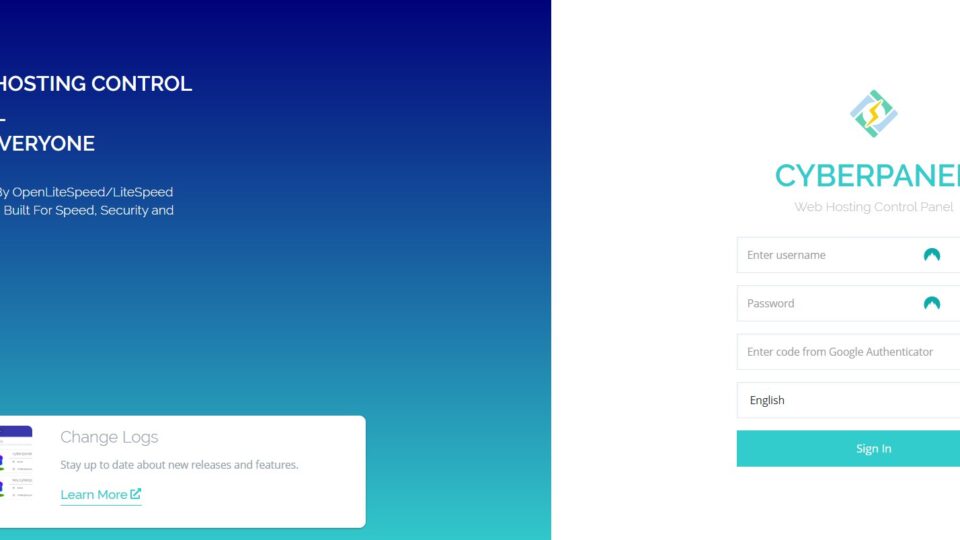
5. CyberPanel Admin Login Once installed, youβll get access details:
Panel URL: arduinoCopyEdithttps://your-server-ip:8090 Username: nginxCopyEditadmin Password: (Generated or manually set during install) Make sure port 8090 is allowed in your firewall settings!
βοΈ Post Installation Tips Change the default admin password immediately Install CSF Firewall for extra securityEnable auto-backups through CyberPanel dashboardSecure your server with SSH key authenticationπ Need High-Performance VPS or Dedicated Servers for CyberPanel? For the best CyberPanel experience, you need reliable, fast servers.
π Check out Servers9 high-performance VPS and Dedicated Servers Optimized for CyberPanel hosting, SSD-powered, and with full root access!
CyberPanel is a game-changer if you want speed, security, and simplicity without paying high license fees like cPanel. By following the above steps and starting with a clean, strong server, youβll have a modern, optimized hosting environment ready in just minutes!
Post navigation
https://servers9.com/wp-content/cache/breeze-minification/js/breeze_how-to-install-cyberpanel-on-your-server-recommend-1-13742-inline_script_3.js?ver=1786054570
https://servers9.com/wp-content/cache/breeze-minification/js/breeze_how-to-install-cyberpanel-on-your-server-recommend-1-13742-inline_script_4.js?ver=1786054570
https://servers9.com/wp-content/cache/breeze-minification/js/breeze_how-to-install-cyberpanel-on-your-server-recommend-1-13742-inline_script_5.js?ver=1786054570
https://servers9.com/wp-content/cache/breeze-minification/js/breeze_how-to-install-cyberpanel-on-your-server-recommend-1-13742-inline_script_6.js?ver=1786054570
https://servers9.com/wp-content/cache/breeze-minification/js/breeze_how-to-install-cyberpanel-on-your-server-recommend-1-13742-onecommunity-js-login.js?ver=1786054570
https://servers9.com/wp-content/cache/breeze-minification/js/breeze_how-to-install-cyberpanel-on-your-server-recommend-1-13742-wp-includes-js-imagesloaded.min.js?ver=1786054570
https://servers9.com/wp-content/cache/breeze-minification/js/breeze_how-to-install-cyberpanel-on-your-server-recommend-1-13742-wp-includes-js-masonry.min.js?ver=1786054570
https://servers9.com/wp-content/cache/breeze-minification/js/breeze_how-to-install-cyberpanel-on-your-server-recommend-1-13742-onecommunity-shortcodes-js-functions.js?ver=1786054570
https://servers9.com/wp-content/cache/breeze-minification/js/breeze_how-to-install-cyberpanel-on-your-server-recommend-1-13742-assets-js-ultp-youtube-gallery-block.js?ver=1786054570
https://servers9.com/wp-content/cache/breeze-minification/js/breeze_how-to-install-cyberpanel-on-your-server-recommend-1-13742-onecommunity-js-functions.js?ver=1786054570
https://servers9.com/wp-content/cache/breeze-minification/js/breeze_how-to-install-cyberpanel-on-your-server-recommend-1-13742-assets-js-extension-reading-progress-bar.min.js?ver=1786054570
https://servers9.com/wp-content/cache/breeze-minification/js/breeze_how-to-install-cyberpanel-on-your-server-recommend-1-13742-inline_script_7.js?ver=1786054570
https://servers9.com/wp-content/cache/breeze-minification/js/breeze_how-to-install-cyberpanel-on-your-server-recommend-1-13742-js-view-general.min.js?ver=1786054570
https://servers9.com/wp-content/cache/breeze-minification/js/breeze_how-to-install-cyberpanel-on-your-server-recommend-1-13742-inline_script_8.js?ver=1786054570